
Cloudflare, one click from your menu bar

Check your domains without a browser tab.

Domains, DNS, traffic, cache, R2, Workers and Tunnels for every zone on your account. Live in a popover the size of a postcard.

Try Cfbar free for 7 days Requires macOS 15 Sequoia or later · 7 days free, no card needed
Cfbar mascot, a fluffy orange cloud with glasses, watching a laptop
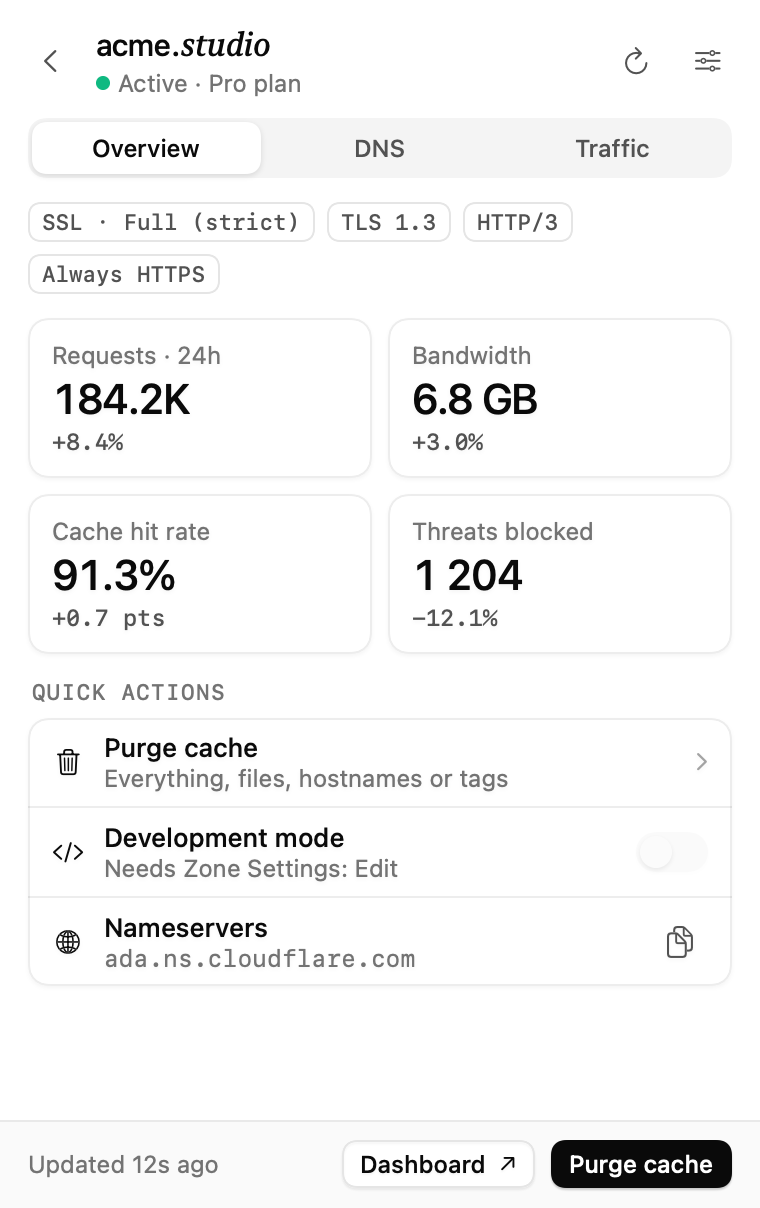
acme.studioActive · Pro plan
SSL · Full (strict)TLS 1.3HTTP/3Always HTTPS
Requests · 24h184.2K+8.4%
Bandwidth6.8 GB+3.0%
Cache hit rate91.3%+0.7 pts
Threats blocked1 204−12.1%
Quick actions
Purge cacheEverything, files, hostnames or tags
Development modeNeeds Zone Settings: Edit
Nameserversada.ns.cloudflare.com
Updated 12s agoDashboard Purge cache

Your whole account. One popover.

Click the cloud. Pick a domain. Everything the dashboard shows you first is already there.

Every zone at a glance.

Requests, bandwidth, cache hit rate and threats blocked, each compared with the day before. SSL mode, TLS 1.3 and HTTP/3 sit on top so a wrong setting never hides.

    Overview screen for acme.studio

    Everything you open the dashboard for.

    The things you check every day, minus the login, the tabs and the loading spinners.

    Domains

    Every zone, one list.

    Status, plan and a 24-hour sparkline for each domain. Paused zones and pending certificates are flagged before they bite.

    acme.studio
    Pro · 184.2K requests
    acmeapp.io
    Free · 482K requests
    brightlabs.co
    Pro · Certificate pending
    oldsite.net
    Free · Paused

    paused
    Cache

    Your hit rate, live.

    Cached versus uncached requests for every zone, compared with the day before.

    91.3%
    168.2K of 184.2K cached
    Traffic

    Charts that answer fast.

    Requests over 24 hours, 7 or 30 days, with visitors, errors and top countries.

    15:4203:42now
    DNS

    Copy a record, or change it.

    Click to copy, or add, edit and delete with a DNS edit token. Unproxied records get a warning.

    A
    @
    104.21.8.12
    CNAME
    api
    acme-api.fly.dev
    MX
    @
    mx.mailprovider.net
    Purge

    Purge, safely.

    Everything, URLs, hostnames or tags, with a confirm step.

    Purge everything Purged acme.studio
    R2 storage

    Buckets and the free tier.

    Storage and operations against the free limits, plus a bucket browser.

    6.42 GB
    64% of 10 GB free$0.00
    412K
    Class A
    3.1M
    Class B
    Workers

    Workers, Pages, Tunnels.

    Requests, p50 latency and error rate per Worker. Anything over 1% is flagged.

    edge-router
    1.4M req · 3 ms p50
    0.01%
    webhook-intake
    8.9K req · 6 ms p50
    2.1%
    home-lab tunnel
    Healthy · 4 connectors
    2026.10
    Refresh

    Always fresh.

    Every open, and every 1 to 15 minutes.

    Updated 12s ago
    Cfbar mascot holding a shield
    Privacy

    Read-only by default.

    Cfbar works with one Cloudflare API token you create. Give it read access and it can't change a thing. Add DNS edit or cache purge only if you want Cfbar to make changes.

    Token

    Kept in your Keychain.
    Never in a plain file, never synced anywhere.

    Network

    api.cloudflare.com only.
    No analytics, no tracking, no Cfbar server in the middle.

    Writes

    Only what you allow.
    DNS records need Zone · DNS · Edit, cache purge needs Cache & Performance · Cache Purge · Purge. Skip both and Cfbar stays read-only.

    Try it. Then keep it.

    Seven days free, everything unlocked. Buy a license when you're sure.

    7-day free trial
    Regular price $12 , now $9 −25%
    Launch price · license for 1 Mac
    • Every feature, every zone, every account
    • Move your license between Macs anytime
    • Works offline for 14 days between checks
    Buy Cfbar for $9

    Not sure yet? Start the free trial.

    Questions? Answers.

    What token does Cfbar need?

    A Cloudflare API token with read access to your zones, DNS, analytics, R2 and Workers. Two optional extras: Zone · DNS · Edit to add, edit and delete DNS records, and Cache & Performance · Cache Purge · Purge to purge from the menu bar. Cfbar walks you through creating it on first launch.

    Can Cfbar change my DNS or settings?

    Only if your token allows it. With Zone · DNS · Edit, Cfbar can add, edit and delete DNS records, and it asks before every delete. With Cache & Performance · Cache Purge · Purge, it can purge the cache. Zone settings like SSL mode are always read-only.

    Where is my data sent?

    Straight to api.cloudflare.com from your Mac. The token lives in the macOS Keychain. The only other request Cfbar makes is to check your trial or license.

    How often does it refresh?

    Every time you open the popover, plus on a schedule you pick between 1 and 15 minutes. Right-click the cloud icon to refresh by hand.

    What happens when the trial ends?

    Cfbar asks for a license key. Your token and settings stay exactly where they were, so you pick up where you left off.

    Can I move my license to a new Mac?

    Yes. Deactivate it in Cfbar's settings on the old Mac and enter the key on the new one.

    Cfbar mascot wearing a cape

    Close the dashboard tab.

    Cfbar lives in your menu bar. Seven days free, no card needed.

    Download for macOS

    Requires macOS 15 Sequoia or later